Agentic Pentest Policy Guidelines
Guidelines for writing a policy for an Agentic Pentest.
This guide explains how to configure a clear, useful policy before running an agentic security test so Hackian can work intelligently, stay within safe boundaries, and focus on the areas that matter most to your business.
What is an agentic pentesting policy and why does it matter?
A pentesting policy is your set of instructions to the autonomous agent that will be testing your systems. Unlike a traditional pentest where a human researcher reads a brief and makes their own judgment, an agentic test relies on this policy to make decisions in real time: what to prioritise, how deep to go, and what to leave alone.
A well-written policy makes the difference between a test that surfaces meaningful vulnerabilities in the right areas and one that produces noise, duplicates, or risks impacting production. Think of it as the briefing you'd give a very thorough, very fast security engineer before they start work.
Before you start
Make sure all assets in your defined scope are healthy and accessible before starting the test. If they're down or returning errors, you'll get incomplete results or false positives.
The policy editor
When setting up an agentic pentest, you'll see the policy editor with three sections: Primary Focus, Testing Goals, and Guardrails. Each serves a distinct purpose and together they shape how the agent approaches your systems.
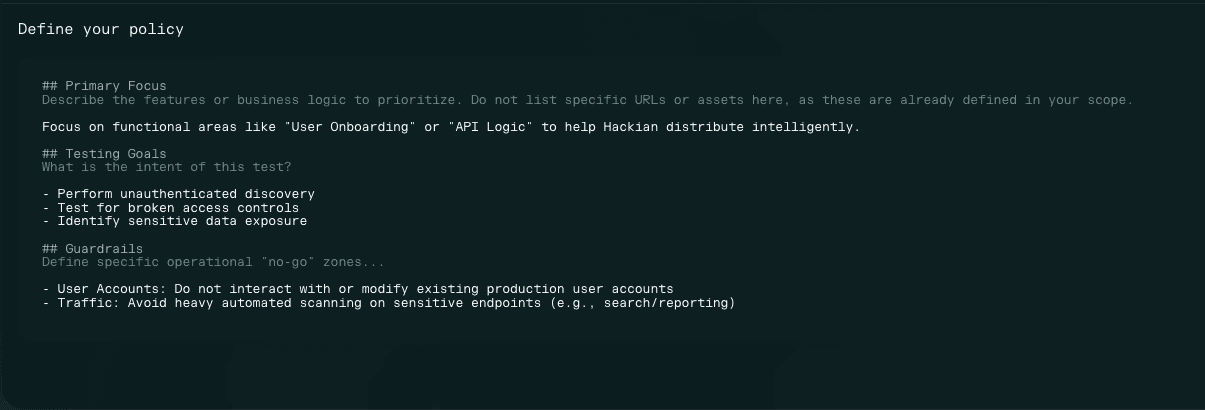
Each section serves a distinct purpose. Here's how to fill them in correctly.
Section by section
Primary Focus
Describe the functional areas or business logic you want Hackian to prioritise. This is not a list of URLs or assets, those are already captured in your scope definition.
Important
Only reference features that are part of your in-scope assets. Do not mention functionality that sits behind out-of-scope assets: the agent won't reach them, and listing them here creates ambiguity about intent.
Good examples:
- User onboarding
- API logic
- Admin panel
- File upload handling
- Payment flows
Why this matters: Hackian uses Primary Focus to distribute work across multiple agents and avoid duplicate findings. The more specific and accurate your focus areas, the better the coverage and signal-to-noise ratio in your report.
Testing Goals
Define the intent of this test. This tells the agent what kind of vulnerabilities to look for and how aggressively to pursue them. Common goals include:
- Perform unauthenticated discovery
- Test for broken access controls
- Identify sensitive data exposure
- Assess business logic flaws
- Check for injection vulnerabilities
You can combine multiple goals. If you have a specific concern, such as a recently changed authentication flow or a new API surface, mention it here to direct the agent's attention.
Guardrails
Guardrails define what the agent must not do. Be explicit. Every guardrail you set protects your production environment, your users, and the reliability of your results.
Standard guardrails to always consider:
- **User accounts: ** do not interact with or modify existing production user accounts that were not provided for the test.
- **Traffic limits: ** avoid heavy automated testing on sensitive endpoints such as search or reporting.
- **Destructive actions: ** do not delete, alter, or corrupt any production records or files.
- **Third-party services: ** do not trigger charges or real actions on connected services (e.g. payment processors, email providers).
Scoping rule
Only reference endpoints or features that are in scope. Adding guardrails for out-of-scope assets creates confusion. If an asset isn't in scope, the agent won't interact with it regardless.
Common mistakes to avoid
- Listing specific URLs in Primary Focus: put those in scope, not the policy.
- Mentioning assets or features that are out of scope: the agent won't reach them and it adds noise.
- Leaving Guardrails empty: always define at minimum the user account and traffic rules.
- Starting the test while in-scope assets are degraded or behind a maintenance page.