Audit Logs
Review a history of user activity in your organization for compliance, forensic investigation, and accountability.
Audit Logs give organization owners and admins a detailed history of critical user activity across the Ethiack Portal, making it easy to trace who did what and when. This is useful for compliance, forensic investigations, and spotting unusual or unauthorized activity.
Audit Logs are available to organization accounts on plans that include the feature. You can access them by clicking the Audit Logs tab in the security section of your settings, or go directly to https://portal.ethiack.com/settings/security/auditlogs. Only organization owners and admins can view this page.
What's recorded
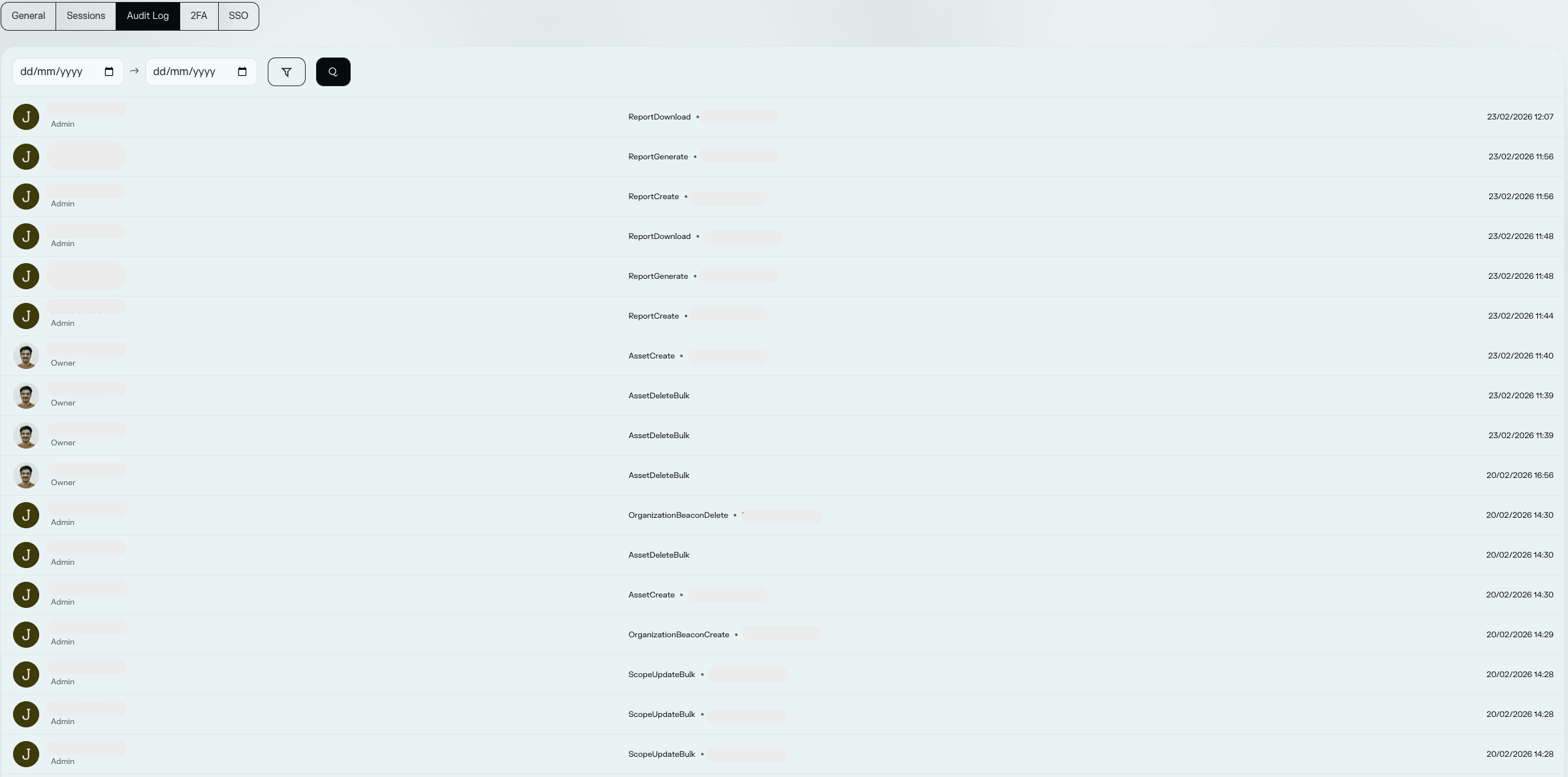
Each entry in the Audit Log shows:
- Who: the member who performed the action, along with their avatar and role (Owner, Admin, Analyst, or Viewer).
- What: the action that was performed, such as
AssetCreate,ReportDownload, orScopeUpdateBulk. - On what: the affected resource type and ID, when applicable (for example, which organization or asset was targeted).
- When: the timestamp of the action, shown in UTC.
Recorded actions
The Audit Log covers actions across most areas of the Portal, including:
- Authentication & security: signing up or joining an organization (including via SSO/OAuth), setting up 2FA, using backup codes, registering a passkey, and changing your password or email.
- Assets & scope: creating, importing, updating, or deleting assets, and moving assets in or out of scope.
- Domains: adding, verifying, or removing a domain.
- Events & pentests: creating, submitting, or launching an event, updating its timeline or settings, managing credentials and policies, and handling hacker invitations and applications.
- Findings: submitting a finding, editing it, adding comments, managing collaborators, assigning it to someone, and requesting a retest.
- Reports: creating and downloading reports.
- Organization: inviting members, changing a member's role, resetting a member's 2FA, updating billing information, and editing the organization's profile.
- Integrations & SSO: connecting or disconnecting integrations (Slack, Jira, Splunk, Discord, webhooks, and more), and configuring or toggling SSO.
- API keys & notifications: generating an API key and updating notification preferences.
Not every possible action is instrumented yet, so this list will keep growing as coverage expands.
Filtering results
You can narrow down the list using the available filters:
- Date range: restrict results to a specific start and end date.
- Member: show only actions performed by a specific organization member.
- Event type: show only a specific kind of action.
Filters can be combined, and your selection is remembered as you navigate. Results are always sorted with the most recent activity first and are paginated.
Programmatic access
Audit logs are also available through the Audit Logs API, so you can export or integrate them with your own tooling.